
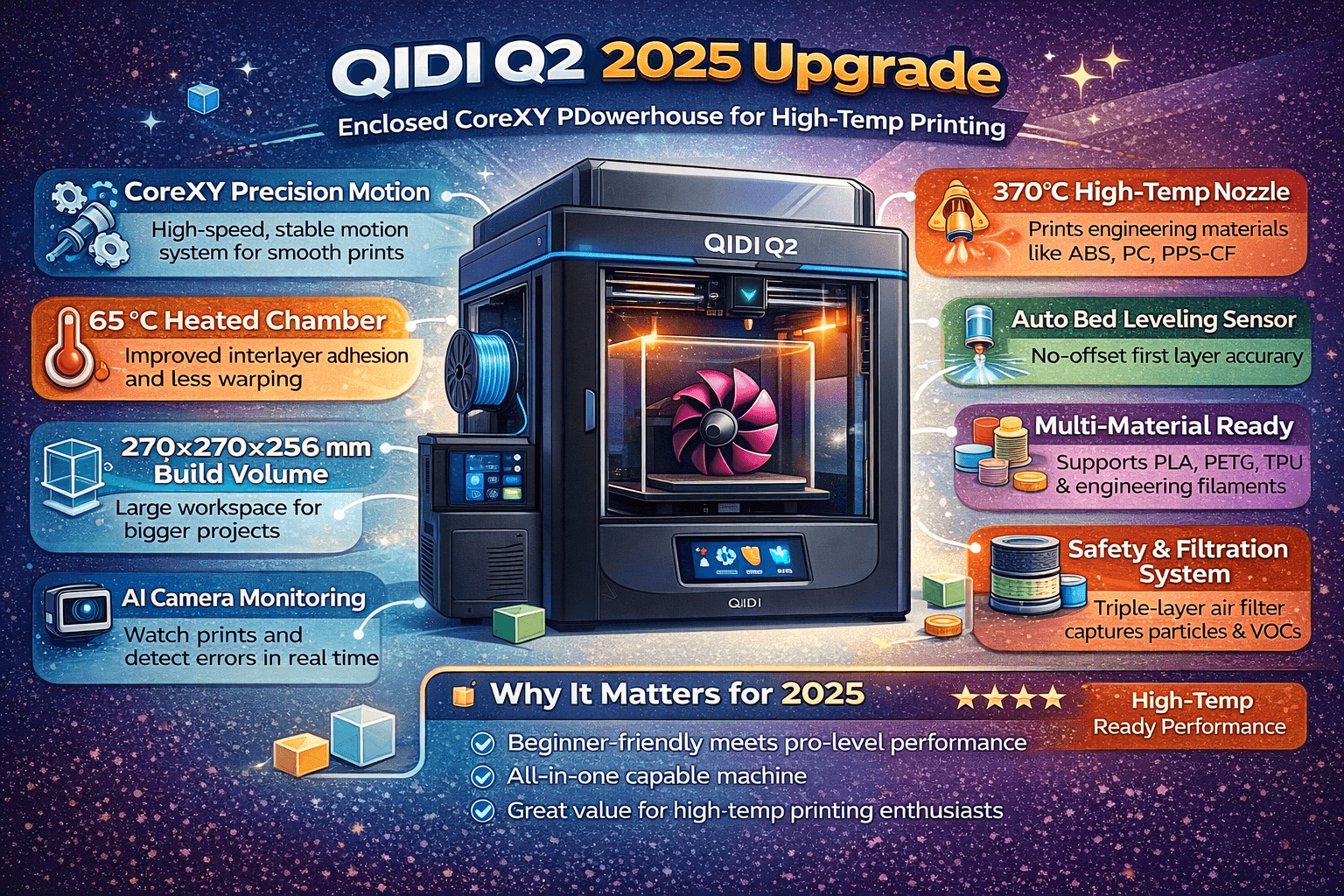
Quick Verdict: The QIDI Q2 is a capable enclosed CoreXY printer that excels at high-temperature engineering materials. With its 370°C hotend, 65°C heated chamber, and advanced auto-leveling, it delivers excellent print quality for demanding filaments like ABS, PC, and carbon fiber composites. However, the optional QIDI Box multi-color unit suffers from severe filament path friction issues, making it unreliable for multicolor prints. As a single-color workhorse, the $499 Q2 is a strong contender for makers who need professional-grade capabilities without breaking the bank.
Who This Printer Is For: The Q2 targets prosumers and small workshops needing reliable high-temperature material printing. It’s ideal for functional prototypes, engineering parts, and makers working with ABS, ASA, PC, PA, and carbon fiber reinforced filaments. Beginners may find the enclosed design and chamber heating overwhelming, but the excellent auto-leveling and intuitive interface make it accessible. Skip the $649 combo—the QIDI Box isn’t ready yet—and stick with standalone single-color printing.
Deep Performance Analysis
High-Temperature Mastery
The QIDI Q2’s standout feature is its ability to handle demanding engineering filaments that would choke many printers in its price class. The bimetal hotend reaches 370°C, enabling smooth extrusion of polycarbonate (PC), polyphenylene sulfide (PPS-CF), polyamide (PA), and glass or carbon fiber reinforced polymers. The second-generation chamber heating maintains a steady 65°C—hot enough to prevent warping and improve interlayer adhesion for ABS, ASA, and PC—yet the sliding glass lid can be opened for better cooling when printing PLA or PETG.
During testing, the Q2 produced flawless PC and PA11 CF parts without warping or layer separation. The enclosed environment keeps ambient temperature stable, which is critical for high-temp materials. The air filtration system (G3 pre-filter, H12 HEPA, activated carbon) captures 99.5% of particulates, making it safer to print ABS and other VOCs in enclosed spaces like a home office.
Precision Engineering with CoreXY
The Q2 uses a CoreXY motion system with a 1.5GT high-density timing belt and linear rails on the X-axis. This delivers smooth, quiet operation even at 300 mm/s print speeds. The all-metal frame adds rigidity and reduces resonance, resulting in clean surfaces without ringing or ghosting. Two independent Z lead screws ensure even bed leveling across the 270×270 mm plate.
The loadcell-based auto-leveling system proves remarkably accurate. Instead of a BLTouch probe with an offset to compensate for, the Q2’s hotend-integrated sensor touches the bed directly, producing perfect first layers with zero guesswork. Calibration is a one-tap process from the touchscreen, and the system rechecks at the start of every print.
Direct Drive for Flexible Filaments
The hardened steel direct drive extruder can handle TPU up to 95A hardness. The gear ratio provides enough torque to push flexible filaments without slipping. However, the PTFE path from the extruder to the hotend has a sharp bend; printing very soft TPU (<85A) may cause jamming. For most flexible prints, the Q2 performs well with slower speeds (~45 mm/s).
The QIDI Box Multicolor Problem
The $150 QIDI Box is marketed as a 4-color multi-material system that mounts atop the Q2. It includes its own chamber heater (matching the printer’s 65°C) and a built-in filament dryer that can operate while printing. In theory, it’s a compelling upgrade. In practice, the filament path suffers from an extreme bend at the point where the Bowden tubes connect to the printer’s extruder. This creates excessive friction, causing frequent jams and filament grinding—even with rigid engineering filaments.
Tom’s Hardware encountered these failures repeatedly, despite trying two different Box units and even printing a riser mod to increase clearance. QIDI’s own community forum reports similar issues. Until QIDI releases a fix—either a replacement part or a redesigned PTFE coupling—the Box is not recommended for color swaps. The good news: it makes an excellent standalone filament dryer.
Real Use Cases
Functional Prototypes with Carbon Fiber
The Q2 shines when printing strong, durable parts. With a 370°C hotend and 65°C chamber, it handles PA11 CF, PC-CF, and PPS-CF with ease. The printed parts are lightweight yet incredibly strong, suitable for mechanical components, brackets, drone parts, and custom tooling. The auto-leveling ensures consistent layer adhesion, and the chamber heating eliminates warping on large prints.
Small Batch Production
For makers running small businesses, the Q2’s speed (up to 300 mm/s with decent quality) and reliability make it a workhorse. The AI camera monitors prints and flags potential spaghetti failures, which is valuable when running unattended overnight. The loadcell leveling means minimal babysitting—first layers just work.
High-Temp Materials at Home
Unlike budget printers capped at 250°C, the Q2’s bimetal hotend and enclosed design let you safely print ABS and ASA indoors. The activated carbon filter reduces odors, and the MET certification provides peace of mind. The sliding lid design is clever: keep it closed for ABS/PC to maintain chamber temperature, or slide it back for PLA to cool the electronics.
Avoid Multicolor (For Now)
The QIDI Box experience is a letdown. While it can dry filament while printing—a nice touch—the filament path flaw makes multicolor printing unreliable. Stick to single color, or consider alternatives like the Anycubic Kobra S1 Combo ($549) or Bambu Lab P1S Combo ($549) if you need reliable color changes.
Strengths
- Exceptional high-temperature capability – 370°C hotend + 65°C chamber opens doors to engineering-grade filaments.
- Outstanding auto-leveling – Loadcell sensor in hotend eliminates probe offset headaches; first layers are consistently perfect.
- Solid build quality – CoreXY with linear rails and all-metal frame ensures stability and longevity.
- Good safety features – MET certified, flame-retardant chamber, active air filtration, multi-sensor temperature monitoring.
- Fast for an enclosed printer – 600 mm/s max speed; 300 mm/s realistic with high-temp materials.
- Versatile slicer support – Works with QIDI Studio, OrcaSlicer, PrusaSlicer; no vendor lock-in.
- AI camera monitoring – Spaghetti detection and timelapse support.
- Large build volume for class – 270³ mm beats many competitors.
- Useful included accessories – Comes with extra nozzles (0.2/0.6/0.8mm), tools, and USB drive.
- Filament NFC recognition – QIDI-brand filament auto-configures settings.
Weaknesses
- QIDI Box is fundamentally broken – Filament path friction causes jams; multicolor printing doesn’t work reliably. (Standalone model unaffected.)
- Touchscreen interference – The screen protrudes and can bump against the glass door when opening/closing.
- PTFE bend for TPU – Tight curve from extruder to hotend can cause issues with very soft filaments (<85A).
- Noisy operation – QIDI Box loader and cutter are loud; even without Box, CoreXY motion sounds are noticeable.
- Slicer filament database mismatch – QIDI Studio’s filament list doesn’t match printer screen options, causing sync errors when sending jobs.
- No built-in spool holder – Requires external holder (included) mounted on rear.
- Limited aftermarket community – Fewer mods and guides compared to Bambu Lab or Creality.
Competitor Comparison
| Feature | QIDI Q2 |
|---|---|
| Price | $499 |
| Build Volume | 270×270×256 |
| Max Hotend Temp | 370°C |
| Chamber Heating | 65°C |
| Auto Leveling | Loadcell (no probe) |
| Multicolor | QIDI Box (unreliable) |
| Filtration | HEPA + carbon |
| Safety Cert | MET + IECEE CB |
| Max Speed | 600 mm/s |
| Slicer Lock-in | None |
| Camera | 1080P AI |
| Extruder | Direct drive gear |
| Target Use | High-temp engineering |
Bottom line: The Q2 wins on hotend temperature and safety certifications. It’s the only printer in this bracket that can reliably print PPS-CF and PC-CF without aftermarket hotend upgrades. If you need multicolor, the Kobra S1 Combo and P1S are better choices at similar price points. But if your focus is high-temperature functional materials, the Q2 stands alone.
Verdict
The QIDI Q2 is a very good printer let down by an unusable accessory. Ignore the combo bundle—the $499 standalone model delivers excellent print quality for engineering materials, thanks to its hotend, chamber, and CoreXY precision. Auto-leveling is best-in-class, and the safety certifications make it suitable for indoor use. It’s not perfect (noisy, slicer sync issues, limited TPU flexibility), but for makers who need to print ABS, PC, or carbon fiber without constant failures, the Q2 is a compelling option at this price.
The Q2 would be an easy recommendation if QIDI either fixed the Box or sold the printer without bundling it. As it stands, buy the standalone printer and plan to stick with single-color prints. For multicolor, look elsewhere.
Rating: 4/5 (deduct 1 star for the broken QIDI Box)
FAQ
Can the QIDI Q2 print TPU?
Yes. The direct drive extruder handles TPU up to 95A hardness. For softer filaments (<85A), print speeds should be reduced to 30-45 mm/s and the PTFE path may still cause jams. QIDI provides a TPU printing guide on their wiki.
What materials can the Q2 print?
The Q2 supports PLA, PETG, ABS, ASA, TPU, PA (nylon), PC, PPS-CF, PA-CF, PC-CF, and other reinforced composites. The 370°C hotend and 65°C chamber make it particularly suited for high-temperature engineering filaments.
Is the QIDI Box worth buying?
No. The multi-color unit suffers from severe filament path friction that causes frequent jams. It can serve as a filament dryer, but color swapping is unreliable. QIDI has not yet released a fix.
How does the loadcell auto-leveling work?
The hotend itself has a loadcell sensor that gently taps the bed to measure distance. There’s no probe offset to calibrate—the system measures the exact nozzle position relative to the bed. Calibration takes seconds and yields perfect first layers.
Can I use third-party slicers with the Q2?
Yes. The Q2 runs Klipper firmware and is compatible with QIDI Studio (recommended), OrcaSlicer, and PrusaSlicer. Supported file formats include STL, OBJ, 3MF, and STEP/STP.
Does the Q2 have power loss recovery?
Yes. The printer remembers its position and resumes the print after power is restored.
Is the Q2 safe to use indoors?
The Q2 is MET certified for product safety in the US and Canada, and IECEE CB certified internationally. The enclosed chamber is flame-retardant and includes an advanced air filtration system (G3 pre-filter, H12 HEPA, activated carbon) that captures 99.5% of particulates, making it safer for ABS/ASA printing in well-ventilated indoor spaces.
How fast can the Q2 print?
The theoretical maximum is 600 mm/s with 20,000 mm/s² acceleration, but practical speeds for high-quality prints are 150-300 mm/s depending on material and nozzle size. High-temperature filaments typically run at 100-150 mm/s for best layer adhesion.
What’s the difference between the Q2 and Q2 Combo?
The Combo adds the QIDI Box multicolor unit for $150 extra. Since the Box doesn’t work properly for color changes, the standalone Q2 at $499 is the better buy.
Can I upgrade the Q2 with aftermarket parts?
Yes. The Klipper-based firmware opens the door to advanced tuning like pressure advance, input shaping, and custom macros. The community has already developed mods such as the riser to alleviate Box friction (if you insist on trying multicolor).
Disclosure: This article contains affiliate links. If you purchase through these links, I may earn a commission at no extra cost to you. All opinions expressed are based on independent testing and research.
Affiliate Links:
– Buy the QIDI Q2 2025 Upgrade
Related Reading:
– 3D Printer Comparison Tool – Compare specs across popular printers
– Filament Settings Database – Find optimal temperatures for your printer
– Input Shaping in 3D Printing – Reduce vibrations and improve print quality
– Creality K2 Plus Review – Another high-temp capable CoreXY alternative
– Bambu Lab P1S Review – Best multicolor experience in the prosumer segment