
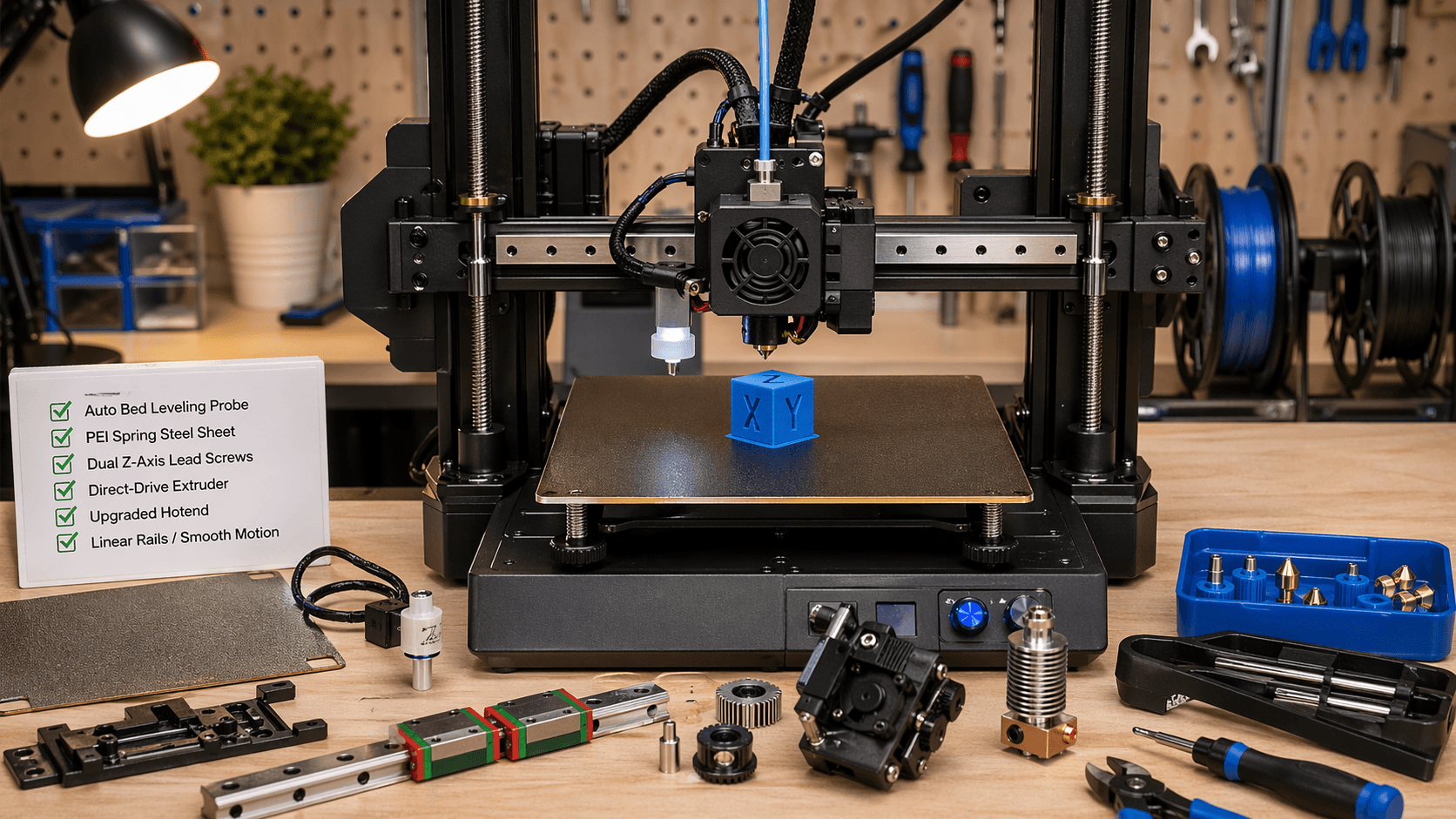
Introduction: Beyond Stock Performance
Budget 3D printers like Ender 3, Creality Ender 3 V2/K, and Anycubic i3 Mega have revolutionized desktop 3D printing with their affordability. But out of the box, they often produce inconsistent results, frequent layer shifting, and mediocre print quality.
Best 3D Printer Hotend Upgrades 2026: Complete Buyer’s Guide
Best 3D Printer Upgrades: Improve Print Quality 2026
The good news is that these printers have massive upgrade potential. Strategic component replacements can turn a $200 printer into a $1000 performer. This guide focuses on upgrades that deliver measurable improvements in print quality, reliability, and user experience.
The Upgrade Philosophy: Prioritize What Matters
Not all upgrades are created equal. Some provide dramatic improvements, while others offer marginal benefits at high cost. The key is understanding which components directly affect print quality:
| Component | Impact on Print Quality | Cost Level | Difficulty |
|---|---|---|---|
| Extruder | Direct Drive | $$ | Easy |
| Bed Leveling | Critical | $ | Medium |
| Frame Reinforcement | Foundational | $ | Easy |
| Hotend | High | $$$ | Medium |
| Motors | Medium | $$ | Hard |
Essential First Upgrades ($50-150)
1. Auto Bed Leveling System
Manual bed leveling is tedious and often inconsistent. Auto bed leveling eliminates this headache and ensures consistent first-layer adhesion.
Benefits:
- Consistent first layers: No more failed prints due to poor bed contact
- Save time: 5-10 minutes per print saved on leveling
- Beginner friendly: No need to develop manual skills
- Flexibility: Works with various build surfaces (glass, PEI, spring steel)
Top Options:
- BLTouch/SKRTouch: Pneumatic probe with 5mm detection range
- CR-20 Auto Bed Leveling: Electromagnetic probe for Creality printers
- TouchMI: Capacitive probe with adjustable sensitivity
Amazon link: BLTouch Auto Bed Leveling Probe
2. PEI Spring Steel Sheet
The stock build plate is often poorly leveled and doesn’t hold PETG well. A PEI-coated spring steel sheet provides excellent adhesion and flexibility.
Benefits:
- No glue needed: PETG and PLA stick without any adhesive
- Flexible removal: Simply bend to release prints
- Durable: Resists warping and lasts for years
- Multi-material: Works with PLA, PETG, ABS, TPU
Installation Tips:
- Clean both surfaces before mounting
- Use spring clips to secure corners
- Level with auto bed leveling system
Amazon link: PEI Spring Steel Build Sheet
3. Dual Z-axis Lead Screw Upgrade
Budget printers often have Z-axis wobble due to single lead screws and motors. Dual Z-axis drives eliminate this issue.
Benefits:
- Eliminates Z wobble: No more layer shifting at corners
- Better first layers: More consistent bed leveling
- Improved precision: Better dimensional accuracy
Compatibility:
- Ender 3/V2/K: Requires dual Z motor mounts and extension cables
- Anycubic i3 Mega: Special mounting plates required
- Tronxy X5SA: Native dual Z support
Amazon link: Dual Z-axis Lead Screw Kit
Mechanical Stability Upgrades ($100-250)
4. V6 Volcano Hotend
>The stock hotends are often the biggest bottleneck for print quality. A V6 Volcano hotend provides better heat management and allows for faster printing.
Benefits:
- Better temperature stability: Less retraction issues
- Allow faster printing: 80mm/s+ with good quality
- Better filament compatibility: Handles flexible filaments better
- Easier maintenance: Quick-swap nozzles
Installation Requirements:
- V6 direct extruder adapter
- New heater block and cartridge
- Thermocouple and wiring
- Requires calibration
Amazon link: V6 Volcano Hotend Assembly
5. Linear Rail Ball Bearings
Printers using V-slot linear rails often suffer from play and flex. Ball bearing linear rails eliminate this for smoother, more precise movements.
Benefits:
- No play: Precise linear movement
- Smooth operation: Reduced vibration during printing
- Better accuracy: More precise geometry
- Low maintenance: Ball bearings don’t need lubrication
Complete Upgrade Kit:
- LM8UU bearings and mounts
- 20mm smooth rods
- Carriage plates
- Mounting hardware
Amazon link: Linear Rail Ball Bearing Kit
6. Direct Drive Extruder
Budget printers typically come with bowden extruders which lose pressure and create retraction issues. A direct drive provides better pressure control and reduces retraction.
Benefits:
- Better retraction: Less stringing and oozing
- More responsive: Instant pressure changes
- Better flexible filaments: TPU, TPE, etc. work much better
- Easier material changes: Shorter filament path
Top Models:
- Bondtech BMG (universal)
- E3D V6 Lite6 (specific to Ender 3)
- Prusa i3 style (Anycubic printers)
Amazon link: Direct Drive Extruder Upgrade
Electronics and Control Upgrades ($200-400)
7. Touchscreen Controller
The stock controllers are basic and lack features. A touchscreen controller with OctoPrint compatibility brings professional control.
Benefits:
- Better UI: Touch interface with preview
- OctoPrint support: Remote control and monitoring
- Better control: Tilt compensation, pressure advance
- Firmware features: Pressure advance, input shaping
Top Controllers:
- Mainsail OS with TFT28/35
- Klipper firmware with TFT35 display
- BIGTREETECH Octopus with TFT28 display
>
>
Amazon link: Touchscreen Controller Display
8. Motor Tuning and Input Shaping
Budget motors are often the source of ringing and vibration issues. Advanced motor tuning can significantly improve print quality.
Benefits:
- Reduced ringing: Smaller surface imperfections
- Faster printing: Higher speeds without quality loss
- Better precision: Less vibration during movement
Implementation Methods:
- Klipper firmware with pressure advance
- Marlin 2.1 firmware with pressure advance
- TMC2209 stepper drivers with StealthChop mode
9. Dual Drive Extruder System
For printing flexible filaments or multi-material prints, a dual drive extruder system provides better control and reliability.
Benefits:
- Excellent flexible filament control: No grinding or buckling
- Better multi-material prints: Precise pressure control
- Reduced retraction: More coordinated movement
Popular Dual Drive Systems:
- Bondtech LGX Lite (modified for single extruder)
- Original Prusa MMU2S (complex but powerful)
>E3D Hemera (dual drive capable)
Amazon link: Dual Drive Extruder System
Upgrade Priority Matrix
| Priority | Upgrade | Impact | Cost | Difficulty |
|---|---|---|---|---|
| High | BLTouch Auto Bed Leveling | Critical | $ | Medium |
| High | PEI Spring Steel Sheet | Critical | $ | Easy |
| High | Dual Z-axis Lead Screw | Critical | $$ | Medium |
| Medium | Linear Rail Ball Bearings | High | $$ | Medium |
| Medium | Direct Drive Extruder | High | $$ | Medium |
| Medium | V6 Volcano Hotend | High | $$ | Medium |
| Low | Touchscreen Controller | Medium | $$$ | Easy |
| Low | Dual Drive Extruder | Medium | $$$ | Hard |
Complete Upgrade Roadmaps
Beginner Budget Path ($150-200)
- BLTouch Auto Bed Leveling – $30-50
- PEI Spring Steel Sheet – $40-60
- Capricorn PTFE Tubing – $10-15
- Dual Z-axis Lead Screws – $70-85
Intermediate Performance Path ($300-400)
- All beginner upgrades
- Linear Rail Ball Bearings – $80-120
- Direct Drive Extruder – $80-120
- V6 Volcano Hotend – $60-80
Professional Grade Path ($500-700)
- All intermediate upgrades
- Touchscreen Controller with OctoPrint – $150-250
- Ball Lead Screw Nuts – $50-80
- Advanced Frame Reinforcement – $50-100
Upgrades to Avoid (Marketing Hype)
Some upgrades provide minimal benefit despite their price tag:
- Fancy LED strips: Pure aesthetic, no quality impact
- Limited edition colors: Functionally identical to standard parts
- Rapid change systems: For non-flexible filaments
- Titan extruder: Overkill for budget printers
- 3D printer dust covers: Nice to have but not essential
Installation Tips and Best Practices
Before You Start
- Have spare parts on hand in case something breaks
- Watch installation videos for your specific model
- Make sure you have all required tools
- Read through the entire process first
Installation Order
Install upgrades in this logical order:
- Frame stabilization (first!)
- Bed leveling system
- Z-axis improvements
- Extruder upgrades
- Hotend upgrades
- Electronics and control
Calibration After Upgrades
After each major upgrade, perform these calibration steps:
- Re-run bed leveling
- Check E-steps accuracy
- Verify extruder temperature
- Test print quality with a calibration cube
Maintenance After Upgrades
Your upgraded printer still needs regular maintenance:
- Weekly: Clean bed surface and check level
- Monthly: Lubricate linear rods and check belt tension
- Quarterly: Check motor connections and thermocouple
- Annually: Replace wear parts like PTFE tubing and belts
Conclusion: Budget Doesn’t Mean Compromise
With strategic upgrades, even the most budget-friendly 3D printer can deliver excellent results. The key is focusing on components that directly impact print quality rather than flashy add-ons.
Start with the high-priority upgrades (bed leveling, Z-axis stability, better build surface) and gradually work your way up based on your needs. For most users, the $200-400 upgrade path will turn a $200 printer into a $1000 performer.
Remember that the most important component is still your willingness to learn and experiment. Your upgraded printer is a tool – understanding how it works will always yield better results than any component alone.