

The Bambu Lab A1 is the most beginner-friendly 3D printer we’ve ever tested. With auto-calibration, reliable multi-color printing via AMS Lite, and legitimately fast printing, it removes most of the friction that scares new makers away. Buy the Combo with AMS Lite for the full experience.
Affiliate Link: Check price on Amazon
At a Glance
- Best for: first-time buyers who want a hassle-free start
- Standout feature: easy, reliable multi-color with AMS Lite (Combo)
- Why it wins: speed + quality + automation, without the “printer babysitting”
Summary
Bambu Lab has disrupted the 3D printer market with an ecosystem approach. The A1, launched in late 2023 and continuously refined since, represents the culmination of that philosophy: a printer that just works. From unboxing to first print in under an hour, the A1 delivers a frustration-free experience that lets beginners focus on creating rather than troubleshooting.
If you’re shopping right now, you can check current pricing here: Bambu Lab A1 on Amazon.
Key Takeaways
- Setup is effortless – color-coded parts and clear instructions have you printing in about 30 minutes
- Multi-color printing is accessible – the AMS Lite system (included in Combo) makes 4-color printing straightforward
- Speed without sacrificing quality – fast travel and print speeds with 0.08mm layer capability
- Reliability features – auto bed leveling, filament runout detection, error recovery, camera monitoring
- Excellent software – Bambu Studio is user-friendly yet powerful
- Active community – MakerWorld provides free models and strong online support
Quick Recommendation
If you’re buying your first 3D printer and want the least drama per print, get the A1 Combo with AMS Lite. If you’re sure you’ll stay single-color, you can start with the base A1 and add AMS Lite later (usually more expensive separately).
Specifications
| Feature | Specification |
|---|---|
| Build Volume | 256 × 256 × 256 mm |
| Motion System | Cartesian with CoreXY-like kinematics |
| Max Travel Speed | 500 mm/s |
| Max Acceleration | 10,000 mm/s² (walls: 20,000 mm/s²) |
| Nozzle Temperature | Up to 300°C |
| Heated Bed | Up to 100°C |
| Layer Resolution | 0.08 – 0.28 mm |
| Filament Diameter | 1.75 mm |
| Supported Materials | PLA, PETG, TPU, ABS, ASA, others (up to 300°C) |
| Extruder | Direct Drive |
| Bed Surface | Flexible PEI sheet (magnetic) |
| Probe | Automatic bed leveling (nozzle probe) |
| Display | 9cm color touchscreen |
| Connectivity | Wi-Fi (2.4GHz), LAN, USB |
| Camera | Integrated (1 fps) |
| Power Requirements | 24V, 350W |
See current A1 pricing on Amazon →
Pros & Cons
Pros
- Extremely fast printing without quality loss
- Multi-color printing simplifies complex designs
- Auto calibration dramatically reduces setup time
- Bambu Studio is intuitive and powerful
- Error detection and resume functionality
- Active community and extensive model library (MakerWorld)
- Quiet operation compared to competitors
- Compact footprint for its build volume
Cons
- Proprietary ecosystem (parts, filament, software)
- Limited third-party modifications; not open-source flexible
- Camera is low framerate (better for timelapse than real-time monitoring)
- Bambu Cloud unlocks more features (privacy concerns for some)
- Replacement parts must come from Bambu Lab (supply chain limitations)
- Repairs can require entire module replacement
- AMS Lite needs extra space next to the printer (bigger footprint)
Comparisons
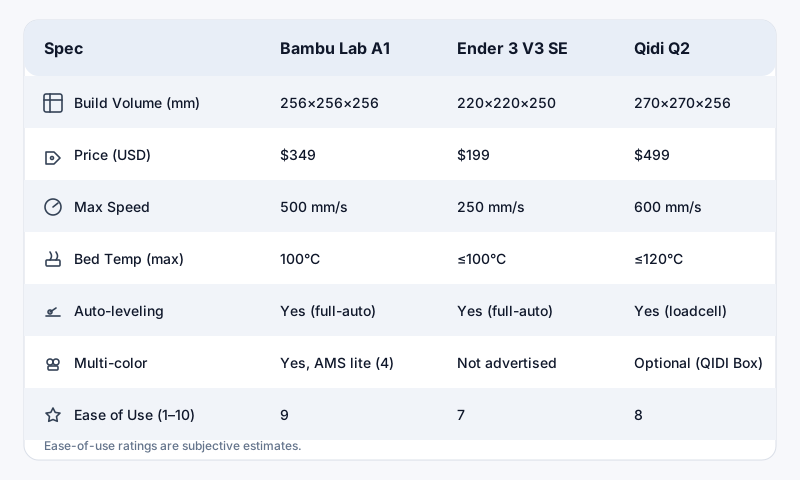
Bambu Lab A1 vs. Bambu Lab A1 mini
The A1 mini (~$299) offers a 180 × 180 × 180mm build volume for smaller projects. It shares the same speed and reliability but lacks the larger build area. For most beginners, the full-size A1 (~$599 without AMS, ~ $899 as the Combo) is worth it for the extra print capacity.
Bambu Lab A1 vs. Creality Ender 3 V3 SE
The Ender 3 V3 SE (~$218) is dramatically cheaper but requires significantly more user involvement: slower speeds, no multi-color system, and more tuning. The Ender is a traditional budget printer that demands tinkering. The A1 is a turnkey solution. Choose the Ender if budget is the absolute priority; choose the A1 for convenience and advanced features.
Bambu Lab A1 vs. Qidi Q2
The Qidi Q2 (~$219) competes strongly on price and often offers an enclosed design with Klipper firmware. However, the A1 wins on multi-color capability and overall polish. The Q2 is an excellent budget alternative if you don’t need color and want a simple, ready-to-run machine.
Want the easiest path to great results? Grab the A1 Combo on Amazon →
First-Time Buyer Guide
Should You Get the AMS Lite?
Yes, if: you plan to print multi-color models, want to use different materials without manual filament swaps, or value the convenience of automatic changes. The AMS Lite adds about $200 to the Combo price but transforms the A1 into a multi-material workhorse.
No, if: you’re absolutely sure you’ll only print single-color and want to minimize cost and footprint. You can add AMS Lite later (usually costs more separately).
Which Nozzle Size?
The A1 includes a 0.4mm nozzle standard. Start there. Optional sizes:
- 0.2mm – ultra-fine detail (slower)
- 0.6mm – faster, stronger prints
- 0.8mm – rapid prototyping and large parts
Filament Recommendations
Beginner-friendly materials, in order:
- PLA – easiest, minimal warping
- PETG – stronger and more temperature-resistant
- TPU – flexible (direct drive helps a lot)
- ABS/ASA – outdoor/engineering (best with enclosure + experience)
Start with PLA from Bambu Lab or reputable brands like eSun or Hatchbox.
Setup and First Print
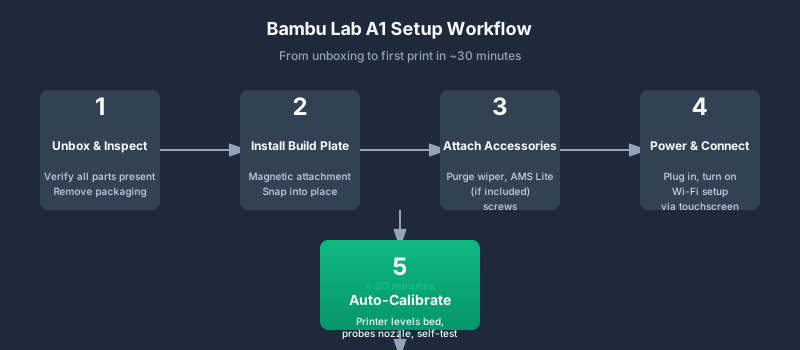
Unboxing the A1 takes about 30 minutes:
- Attach magnetic build plate (snaps into place)
- Install purge wiper (1 screw)
- Connect power and AMS Lite (if included)
- Run initial calibration via touchscreen
Bambu Lab’s guided setup walks you through Wi-Fi connection, filament loading, and bed leveling. The printer then runs a purge line and a test print automatically.
Your first prints should be:
- The included Benchy (speed + quality)
- A calibration cube (dimensional accuracy)
- A multi-color test (if using AMS)
Reliability and Maintenance
The A1 requires minimal maintenance:
- Weekly: clean build plate with isopropyl alcohol; check nozzle for debris
- Monthly: clean AMS Lite filament path; inspect PTFE tubes
- As needed: replace nozzle (quick swap under 1 minute); lubricate rails
The quick-swap nozzle system uses a tool-less design. Heat the hotend, remove the old nozzle, insert the new one. No wrenches required.
Who Is This For?
Perfect for
- First-time buyers who want a hassle-free start
- Makers who want multi-color without complexity
- Small businesses needing reliable prototyping
- Educators seeking low-maintenance classroom printers
- Hobbyists upgrading to advanced features
Not ideal for
- Tinkerers who want to modify firmware/hardware
- Users who require an open-source ecosystem
- People with privacy concerns about cloud connectivity
- Those needing professional support contracts
Verdict
The Bambu Lab A1 lives up to its hype. It’s not perfect (the proprietary ecosystem and cloud dependency are valid concerns), but for beginners and intermediate users, it’s one of the best overall packages available right now.
The A1 removes the traditional friction points of 3D printing: calibration, speed, and multi-material complexity. You can go from unboxing to printing functional, colorful parts in under an hour. That’s genuinely transformative.
If your budget allows: get the A1 Combo with AMS Lite. You’ll spend more time printing and less time troubleshooting. Check current price →
Disclosure: This article contains affiliate links. If you purchase through these links, we may earn a commission at no extra cost to you.