
You no longer need an engineering degree to print a Baby Yoda. A few years ago, 3D printing was a hobby defined by troubleshooting: leveling beds with sheets of paper, unclogging nozzles, and tightening belts. In 2026, the technology has finally matured into an “appliance” phase.
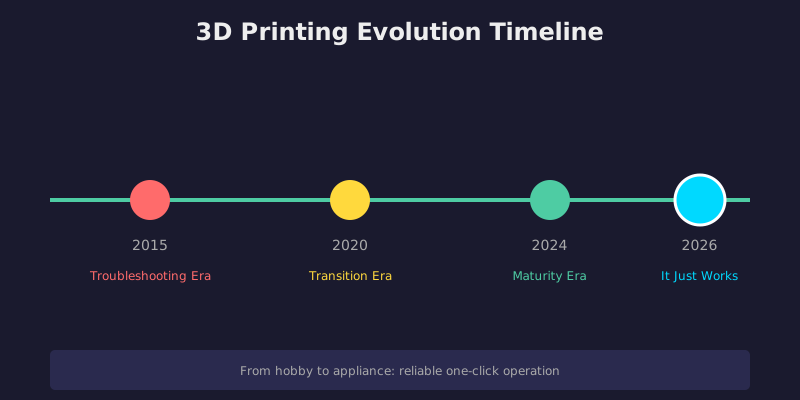
What Changed?
Modern beginner printers now calibrate themselves. They use sensors to:
If you’re looking to get into the hobby today, you should not accept a machine that requires manual tinkering.
Top Picks for 2026
The “No-Brainer” Pick: Bambu Lab A1 Mini
This printer effectively killed the “budget tinkerer” category. The Bambu Lab A1 Mini offers the reliability of a $1,000 machine for a fraction of the price.
Key Features:
Best for: Anyone who wants to hit “print” and walk away.
The Budget King: Creality Ender 3 V3 SE
The “Ender 3” name is legendary in the community, but the V3 SE is the first iteration that’s truly beginner-friendly.
Key Features:
Best for: Someone who needs a larger print area (220x220x250mm) but wants to stay near the $200 mark.
The Feature-Rich Middle Ground: ELEGOO Neptune 3 Pro
Key Features:
Best for: The user who wants a reliable, quiet workhorse for functional parts.
The Resin Pick: ELEGOO Mars 5 Ultra
If your goal is D&D miniatures or jewelry, standard FDM printers won’t capture fine details. You need resin.
Key Features:
Best for: Gamers, model painters, and jewelry makers. (Note: Resin requires ventilation and gloves.)
The “Buy Once, Cry Once” Upgrade: Bambu Lab P1S
Key Features:
Best for: Beginners who want the best consumer experience available today.
Comparison Table
| Printer | Type | Build Volume | Price Range | Best For |
|———|——|————–|————-|———-|
| Bambu Lab A1 Mini | FDM | 180x180x180mm | ~$300 | Set-and-forget printing |
| Creality Ender 3 V3 SE | FDM | 220x220x250mm | ~$200 | Budget beginners |
| ELEGOO Neptune 3 Pro | FDM | 220x220x280mm | ~$250 | Functional parts |
| ELEGOO Mars 5 Ultra | Resin | 143x89x175mm | ~$350 | Miniatures & jewelry |
| Bambu Lab P1S | FDM | 256x256x256mm | ~$449 | Premium experience |
The Bottom Line
The days of spending your first month troubleshooting are over. Modern 3D printers have finally reached the point where you can unbox, assemble in 20 minutes, and start printing successfully within hours.
If you’ve been on the fence about getting into 3D printing, 2026 is the year to jump in.
Related Articles
- cura 5.11.0 released
- Harvard Develops New Method for 3D Printing Soft Robots with Built-In Programmable Movement
- CES 2026 Highlights – AtomForm Palette 300 Brings 36-Color Multi-Material Printing to Consumers
Frequently Asked Questions
Why is 3D printer calibration important?
Calibration ensures dimensional accuracy, proper layer adhesion, and consistent print quality. Without it, parts may have fitting issues, poor surface finish, or structural weaknesses. Regular calibration compensates for mechanical wear and environmental changes.
How often should I calibrate my 3D printer?
Calibrate after any hardware changes, when switching filaments, or if you notice quality degradation. A basic bed level check before each print is good practice, while full calibration (e-steps, flow rate, PID tuning) should be done monthly or after maintenance.
📌 Related Articles
- Creality Creality Ender 3 V3 Plus vs Creality Ender 3 Pro: Full Specs Comparison & Buyer’s Guide
- Best 3D Printer Upgrades That Actually Improve Print Quality: Complete 2026 Guide
- Bambu Lab A1 vs Elegoo Centauri Carbon: Full Specs Comparison & Buyer’s Guide
- 3D Printing Safety Equipment Guide: Respirators, Gloves, and Ventilation for 2026
- Best Budget 3D Printer Upgrades That Actually Improve Print Quality: Belts, Springs, Hotends & More