

Choosing your first 3D printer can be daunting. The market is filled with options ranging from cheap kits to high-end workhorses. For beginners, the ideal printer balances ease of use, reliability, and price. Enter the Creality Hi – a bed-slinger that aims to deliver a premium experience without breaking the bank. Priced at $599 for the Hi Combo with multi-color capability, it competes directly with the Bambu Lab A1 and Creality’s own Ender 3 V3 SE. But does it stand out? After thorough testing and research, we break down everything you need to know about the Creality Hi and whether it deserves a spot on your bench.
If you’re just starting out, check out our Beginner Printers Guide for more in-depth reviews and buying advice.
Specifications
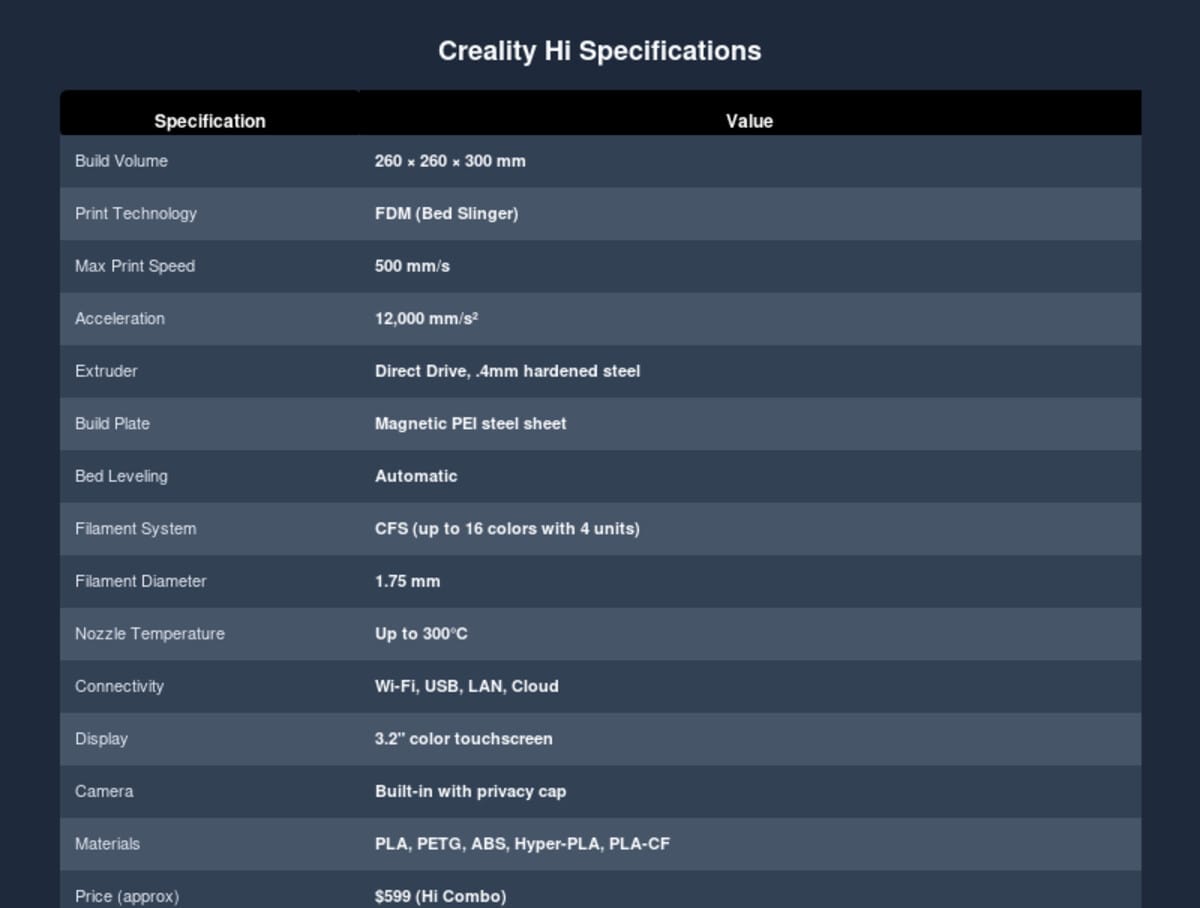
The Creality Hi boasts an impressive set of specs for its price point. Below is a quick overview of its key features and capabilities. For a detailed look, refer to the full specifications table.
Features and Design
Creality went back to the drawing board with the Hi, and it shows. The printer features an all-metal construction with die-cast aluminum alloy parts, resulting in a rigid frame that minimizes vibration – essential for high-speed printing. The design eschews the Core XY layout of some competitors (like Bambu Lab) in favor of a traditional Cartesian bed-slinger, but that doesn’t mean it’s slow. Creality quotes speeds up to 500 mm/s with acceleration of 12,000 mm/s², which is competitive with much pricier machines.
One of the standout features is the Color Filament System (CFS). The base Hi includes one CFS unit that can handle up to four filaments, and you can daisy-chain up to three additional units for a total of 16 colors. The CFS doubles as a dry box, keeping filaments pristine. It’s a well-thought-out system that rivals Bambu’s AMS – though color changes do generate notable filament waste, as is typical with single-nozzle multi-material setups.
The 3.2-inch color touchscreen is responsive and offers deep access to settings. It’s a significant step up from the monochrome displays of old, and the interface is intuitive for both novices and experts. A built-in camera lets you monitor prints remotely via the Creality app, and a handy privacy cap slides over the lens when you don’t want to be on camera.
Other notable features include automatic bed leveling via a strain gauge in the toolhead, direct drive extruder with a hardened steel .4mm nozzle, magnetic PEI-coated steel build plate, and filament runout detection. The printer arrives about 95% assembled; final setup takes just 10-15 minutes and requires no tools beyond what’s included in the box.
Performance and Print Quality
In our testing, the Creality Hi delivered excellent print quality out of the box. Benchy came out in just over 30 minutes at standard settings, with smooth surfaces and minimal stringing. The multi-material prints, like a two-color fidget spinner, were clean with sharp color transitions. However, there are a few caveats:
First, dimensional accuracy was slightly off – averaging around 0.33 mm error across test prints. See also: Creality Creality Ender 3 V3 Plus vs Creality Ende…. For functional parts requiring tight tolerances, this may be an issue, but for most hobbyist projects it’s perfectly acceptable. Second, multi-color printing is slow and wasteful; the high-flow hotend purges a lot of filament between color changes, sometimes approaching the weight of the final print. This is inherent to the design and not unique to the Hi, but it’s worth noting.
The auto bed leveling and Z-tuning are rock-solid, resulting in strong first-layer adhesion. The PEI sheet is almost too sticky – prints really cling, which is great for preventing warping but can make removal a bit of a flex-and-pop exercise. Build rigidity is exceptional, with no noticeable ghosting or resonance even at 500 mm/s.
One limitation: the Hi cannot print TPU. Even bypassing the CFS, the extruder jams with flexible filaments. This isn’t a dealbreaker for beginners (most start with PLA/PETG), but it does restrict material options.
Software and Connectivity
Creality Print 5.1 is the official slicer, based on PrusaSlicer and OrcaSlicer. It’s a capable, user-friendly slicer that integrates nicely with the printer’s features like CFS and auto-bed leveling. You can also use Cura or other slicers, but you may miss some Creality-specific optimizations. Connectivity options include Wi-Fi, USB, LAN, and the Creality Cloud service, allowing wireless file transfer and remote monitoring. The cloud integration is still maturing – files don’t always sync perfectly between Creality Print and Cloud – but it works well enough for basic workflows.
Setup and Ease of Use
Unboxing and assembly are straightforward. The printer comes with the gantry, base, cables, and tools. You insert the upright, secure a few bolts, connect a couple of cables, and you’re almost ready to print. The touchscreen walks you through initial calibration: bed leveling, Z offset, nozzle temperature check. All of this is automated and takes about 10 minutes. The CFS attaches with a single cable and tube, keeping cable management tidy. One minor annoyance: the filament buffer needs to be taped to the frame, which feels like an afterthought.
Once set up, the printer is very forgiving. The auto bed leveling and strain gauge mean you rarely need to tweak anything. Filament changes are handled automatically when the CFS detects a new spool (if using Creality RFID filament). For beginners, this means less time tinkering and more time printing.
Pros and Cons
Pros:
• Exceptional build quality – all-metal, rigid frame
• Fast printing (500 mm/s)
• Multi-color support with CFS (up to 16 colors)
• Automatic bed leveling and calibration
• Strong first-layer adhesion
• Large build volume (260×260×300 mm)
• Built-in camera and touchscreen
• Easy setup (95% pre-assembled)
Cons:
• Slow and wasteful multi-color printing
• Cannot print TPU
• Dimensional accuracy not for precision engineering
• Startup takes ~1 minute
• WiFi/Cloud sync can be glitchy
Creality Hi vs Competitors — Specs at a Glance
See how the Creality Hi compares to two popular alternatives in the beginner-friendly segment.
| Feature | Creality Hi | Bambu Lab A1 | Ender 3 V3 SE |
|---|---|---|---|
| Price | $499 | $549 | $429 |
| Build Volume | 280 × 280 × 280 mm | 256 × 256 × 256 mm | 220 × 220 × 250 mm |
| Max Speed | 500 mm/s | 500 mm/s | 500 mm/s |
| Kinematics | Cartesian (bed-slinger) | CoreXY | Cartesian (bed-slinger) |
| Multi-Color | Yes — CFS (up to 16 colors) | Yes — AMS Lite (4 colors) | No |
| Display | 3.2″ color touchscreen | No screen (app-controlled) | Basic monochrome LCD |
| Bed Leveling | Automatic (strain gauge) | Automatic | Automatic (CR Touch) |
| Camera | Built-in (with privacy cap) | Optional add-on | No |
| Best For | Multi-color on a budget | Speed & polish | Single-color value |
Comparison with Competitors
How does the Creality Hi stack up against other beginner-friendly printers? Let’s compare it with two popular alternatives: the Bambu Lab A1 and the Creality Ender 3 V3 SE.
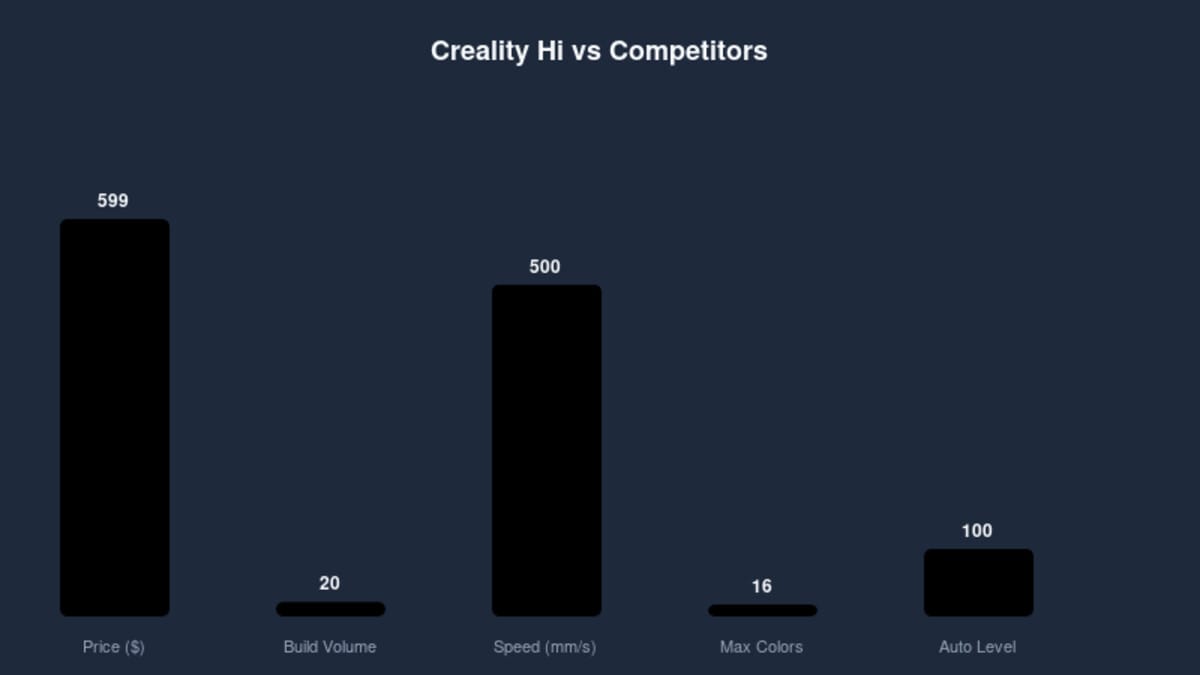
The Bambu Lab A1 ($549) is a Core XY printer with similar speed claims but better acceleration and faster color changes thanks to its AMS system. It’s also quieter and can print TPU. The A1 has a slightly smaller build volume (256 mm cube) and a more compact footprint. Both offer multi-material, but the A1 is generally faster in practice. The Hi counters with a marginally larger build volume and a lower entry price for the single-color version, though the A1 often goes on sale.
The Creality Ender 3 V3 SE ($429) is the budget single-color option from Creality. It shares the same 500 mm/s speed and similar all-metal design, but lacks CFS entirely. Build volume is smaller (220×220×250 mm). If you don’t need color, the Ender 3 V3 SE offers most of the Hi’s performance at a significantly lower price. However, the Hi’s automatic bed leveling and touchscreen are nicer than the Ender’s more basic interface.
Ultimately, the Hi fills a niche: a Creality-branded multi-color printer with a large build volume and a premium feel, without the Core XY complexity. It’s a solid choice if you want color but don’t want to step up to the much pricier K2 Plus.
Verdict
The Creality Hi is an exceptionally well-built 3D printer that delivers great print quality and a host of features for beginners and enthusiasts. Its all-metal construction, automatic calibration, and multi-color capability make it a turnkey solution for anyone getting into 3D printing. The $599 price for the Combo puts it in direct competition with the Bambu Lab A1, and while the A1 might have an edge in speed and material flexibility, the Hi holds its own with a larger build volume and Creality’s ecosystem support. For those who prioritize ease of use, strong adhesion, and a reliable out-of-the-box experience, the Creality Hi is one of the best budget 3D printers available in 2026.
If you’re ready to buy, check the current price at Creality’s website or authorized resellers. And don’t forget to stock up on some good filament – our Beginner Printers section has more tips to get you started.
Frequently Asked Questions
What should I look for in a 3D printer?
Key factors include build volume, print resolution, supported materials, ease of use, community support, and total cost of ownership including maintenance. Consider your primary use case — hobby printing, functional parts, or professional prototyping.
How much does a good 3D printer cost?
Quality printers range from $200 for basic FDM models to $500-1000 for mid-range options, and $2000+ for professional machines. The best value typically sits in the $300-800 range for most users.
📌 Related Articles
- Creality Creality Ender 3 V3 Plus vs Creality Ender 3 Pro: Full Specs Comparison & Buyer’s Guide
- Best 3D Printer Upgrades That Actually Improve Print Quality: Complete 2026 Guide
- ABS 3D Printing Settings Guide: Temperature, Enclosure, and Cooling for Strong Parts
- Bambu Lab A1 vs Elegoo Centauri Carbon: Full Specs Comparison & Buyer’s Guide
- Best Budget 3D Printer Upgrades That Actually Improve Print Quality: Belts, Springs, Hotends & More