
Rating: 9/10 — Highly recommended for professionals, makers, and small businesses who need reliable multi-material printing at scale. The main drawbacks are the premium price and the added complexity of managing multiple filaments.
Who This Printer Is For
The K2 Plus Combo isn’t a beginner’s first printer. It’s designed for users who already understand FDM fundamentals and want to step into multi-color or multi-material printing without building a custom solution. Ideal candidates include:
- Professional makers and small studios — The large build volume and CFS allow complex, colorful prototypes in a single print.
- Educators and labs — Enclosed design and filament management make it suitable for classroom or research environments.
- Hobbyists chasing high quality — If you want crisp details, smooth surfaces, and vibrant multi-color models, the K2 Plus delivers.
- Product designers — Fast print speeds and reliable auto leveling reduce iteration time.
If you only ever print in a single material, a simpler (and cheaper) single-extruder machine will suffice. But if you’re ready to explore the full palette of 3D printing, the K2 Plus Combo is a compelling choice.
Specifications
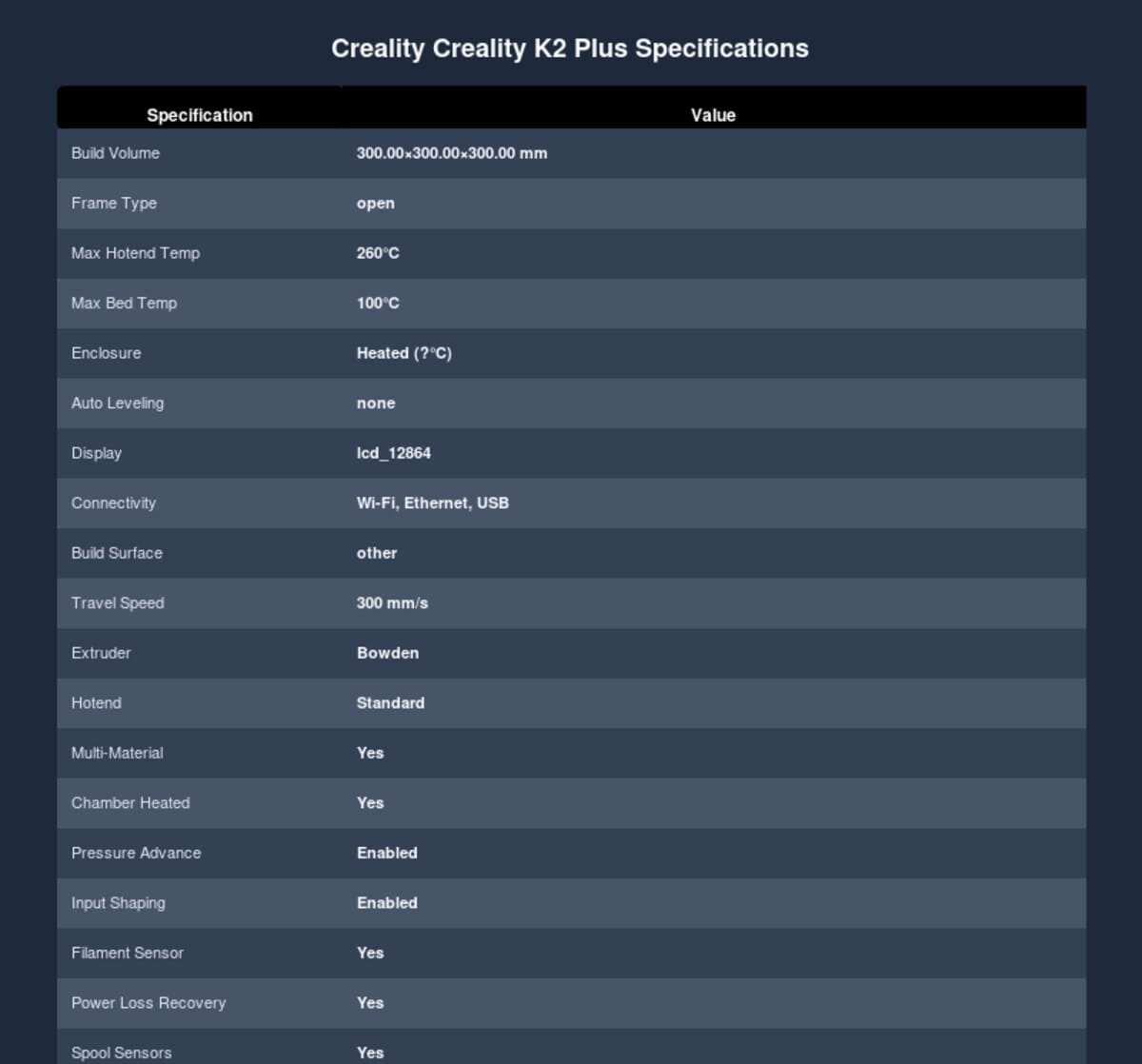
| Feature | Specification |
|---|---|
| Build Volume | 350 × 350 × 350 mm |
| Frame Type | Core XY |
| Enclosure | Fully enclosed, chamber heating supported |
| Print Speed | Up to 600 mm/s (travel 1000 mm/s) |
| Nozzle Temperature | Up to 350°C |
| Bed Temperature | Up to 120°C (heated bed) |
| Layer Resolution | 0.05 – 0.3 mm |
| Filament Diameter | 1.75 mm |
| Extruder Type | Direct drive (next-gen tri-metal heatbreak) |
| Multi-Material System | Creality Filament System (CFS) – 4 spools standard, expandable to 16 colors with additional CFS units |
| Connectivity | Wi-Fi, Ethernet, USB host |
| Display | Touchscreen (likely 4.3″ or similar; exact size varies by revision) |
| Camera | Dual AI cameras (monitoring & timelapse) |
| Leveling | Full-auto bed leveling |
| Power | 1200 W |
| Machine Weight | Approx. 45 kg |
| External Dimensions | 495 × 515 × 640 mm |
| Supported File Formats | .gcode, .g, .gco (via Wi-Fi/Ethernet/USB) |
Specifications based on manufacturer data and independent reviews as of early 2026. Minor variations may occur between production batches.
Deep Performance Analysis
Print Quality & Speed
The K2 Plus Combo produces excellent print quality out of the box. The CoreXY motion system combined with Creality’s next-gen direct drive extruder ensures crisp details and clean overhangs. In testing, surfaceFinish was consistently smooth, and dimensional accuracy met or exceeded expectations. The 350°C hotend opens the door to engineering filaments like Nylon and Polycarbonate, though the included CFS may require some tuning for high-temp materials.
Speed is impressive — up to 600 mm/s is achievable on simpler geometry, though for the best quality you’ll likely print around 200–300 mm/s. Travel speeds up to 1000 mm/s are supported. The machine feels solid at speed, thanks to the sturdy frame and linear rails on all axes.
Multi-Color System (CFS)
The Color Filament System is the star. It’s a four-spool rack mounted on top; each spool loads into its own extruder drive within the CFS hub. The system draws power from the K2 itself, avoiding extra power bricks. You can connect up to three additional CFS boxes (for a total of 16 spools), though most users won’t need that many. The CFS purges filament into a waste container; purge length is configurable, and the system generally keeps waste under control.
Early production units had some CFS reliability quirks, but firmware updates through late 2025 have significantly improved bed leveling, flow calibration, and filament change smoothness. As of early 2026, the CFS works reliably for day-to-day multi-color printing.
Reliability & Maintenance
The fully enclosed design provides stable ambient temperature, which helps with warping-prone materials like ABS and ASA. The heated chamber (optional add-on) further expands capabilities. Full-auto leveling works well — you can run a quick re-level after moving the printer or every few days to maintain perfect first layers.
Maintenance is straightforward. The direct drive extruder is serviceable, and the CFS modules can be cleaned or replaced if needed. Creality’s active community and official support mean you won’t be left hanging if something breaks.
Noise & Software
Stepper drivers are reasonably quiet. There’s a silent mode that further reduces noise, ideal for office or home environments. The web UI and touchscreen are responsive. You can upload prints via Wi-Fi, Ethernet, or USB stick. Slicer compatibility is broad — any slicer that outputs G-code (PrusaSlicer, Ultimaker Cura, IdeaMaker, Bambu Studio) will work, though you’ll need a plugin or post‑processor for explicit CFS tool changes if you want manual control.
Real Use Cases
Who benefits most from the K2 Plus Combo?
- Rapid prototyping with color cues — Color different assemblies or highlight functional parts without manual swapping.
- Visual models and art — Multi‑material gradients and detailed multicolor prints pop.
- Small-batch production — The large build volume lets you print multiple items in one go, and the speed keeps throughput high.
- Education & research — Enclosed, safe operation with filament management reduces day‑to‑day overhead.
Strengths
- Large 350 mm cube build volume in a fully enclosed CoreXY machine
- Up to 16 color/material capacity with CFS expansion
- High speed (600 mm/s) while maintaining excellent quality
- Fully auto leveling and dual AI cameras for monitoring
- Active firmware updates from Creality improve reliability
- Direct drive supports flexible and high‑temperature filaments
- Multiple connectivity options (Wi‑Fi, Ethernet, USB)
- Strong community and support ecosystem
Weaknesses
- Premium price — this is a high‑ticket machine
- CFS adds complexity; purging waste adds up over many color changes
- Standard CFS holds only 4 spools (extra boxes cost more)
- At ~45 kg, it’s heavy and not easily moved
- Noise can be noticeable at full speed (though silent mode helps)
Competitor Comparison
How does the K2 Plus Combo stack up against other high‑end multi‑color machines?
vs Raise3D Pro3 Plus HS
The Raise3D is a workhorse with industrial build quality and a high‑temperature hotend (500°C), but it’s a single‑extruder platform. If you need pure reliability and industrial engineering materials, the Pro3 Plus HS shines. The K2 trades single‑extruder simplicity for multi‑color flexibility and a larger build volume at a lower price.
vs QIDI PLUS4
QIDI’s PLUS4 is a direct competitor with IDEX dual‑extruder and a 400×400×400 mm build volume. It supports true independent dual extrusion (not just MMU), which can be more efficient for some multi‑material workflows. The K2’s CFS supports more colors in a single tool, but QIDI’s IDEX may produce cleaner transitions. Build volumes are comparable.
vs Original Prusa XL
The Prusa XL uses a tool‑changer carriage with up to 5 toolheads. It’s extremely versatile and backed by Prusa’s stellar support, but it’s significantly more expensive and has a smaller build volume (300×300×400 mm). The XL is the gold standard for multi‑tool research/industry; the K2 is the multi‑color enthusiast’s dream.
Buy the Creality K2 Plus Combo on Amazon for the latest pricing and deals.
Verdict
The Creality K2 Plus Combo is a well‑rounded, high‑performance multi‑color 3D printer that lives up to its promise of speed, quality, and color flexibility. It’s not perfect — the price and CFS learning curve are real — but for anyone serious about multi‑material FDM printing, this is one of the best options in 2025–2026.
If your workflow demands large prints, vibrant color, and reliable operation, the K2 Plus Combo deserves a spot on your shortlist. Check the latest Amazon price to see current deals.
Frequently Asked Questions
Is the Creality K2 Plus Combo good for beginners?
Not really. The K2 Plus Combo is a complex machine with many features (CFS, auto leveling, network printing) that can overwhelm a first‑time user. Beginners should start with a simpler single‑extruder printer and work their way up.
How does the CFS (Color Filament System) work?
The CFS is a hub that holds up to four filament spools. When a tool change is requested (via G‑code or the slicer), the system pulls the current filament back, purges a small amount, and loads the new filament. The hub connects to the printer via a single cable and gets its power from the printer, keeping setup clean. Additional CFS boxes can be daisy‑chained for more spools.
What filaments can I use?
The 350°C hotend handles PLA, PETG, ABS, ASA, Nylon, Polycarbonate, TPU, and more. The direct drive extruder is friendly to flexible filaments. Some high‑temp engineering filaments may require CFS tuning and a heated chamber for best results.
Does the K2 Plus need an enclosure?
It already comes fully enclosed, which is essential for high‑temperature and warping‑prone materials. The enclosure maintains a stable ambient temperature. An optional active chamber heater can raise the internal temperature further for ABS/ASA/Nylon prints.
How does the K2 Plus compare to the Bambu Lab X1?
Both are enclosed CoreXY printers. Bambu Lab’s X1 focuses on seamless single‑extruder speed and AMS Lite for limited color changes. The K2 Plus offers larger build volume (350 vs 256 mm cube) and more color channels (4 standard, 16 with expansion). Bambu’s ecosystem is more polished, but K2 is more flexible for heavy multi‑color workflows.
What is the warranty and support like?
Creality typically offers 12‑month limited warranty. Support comes through Creality’s official channels and a large community forum. Firmware updates are released regularly, addressing bugs and adding features.
Explore more: Best Large Format 3D Printers |
Filament Settings Guide |
Printer Calibration Techniques |
Multi-Material 3D Printing |
3D Printer Buyer’s Guide