
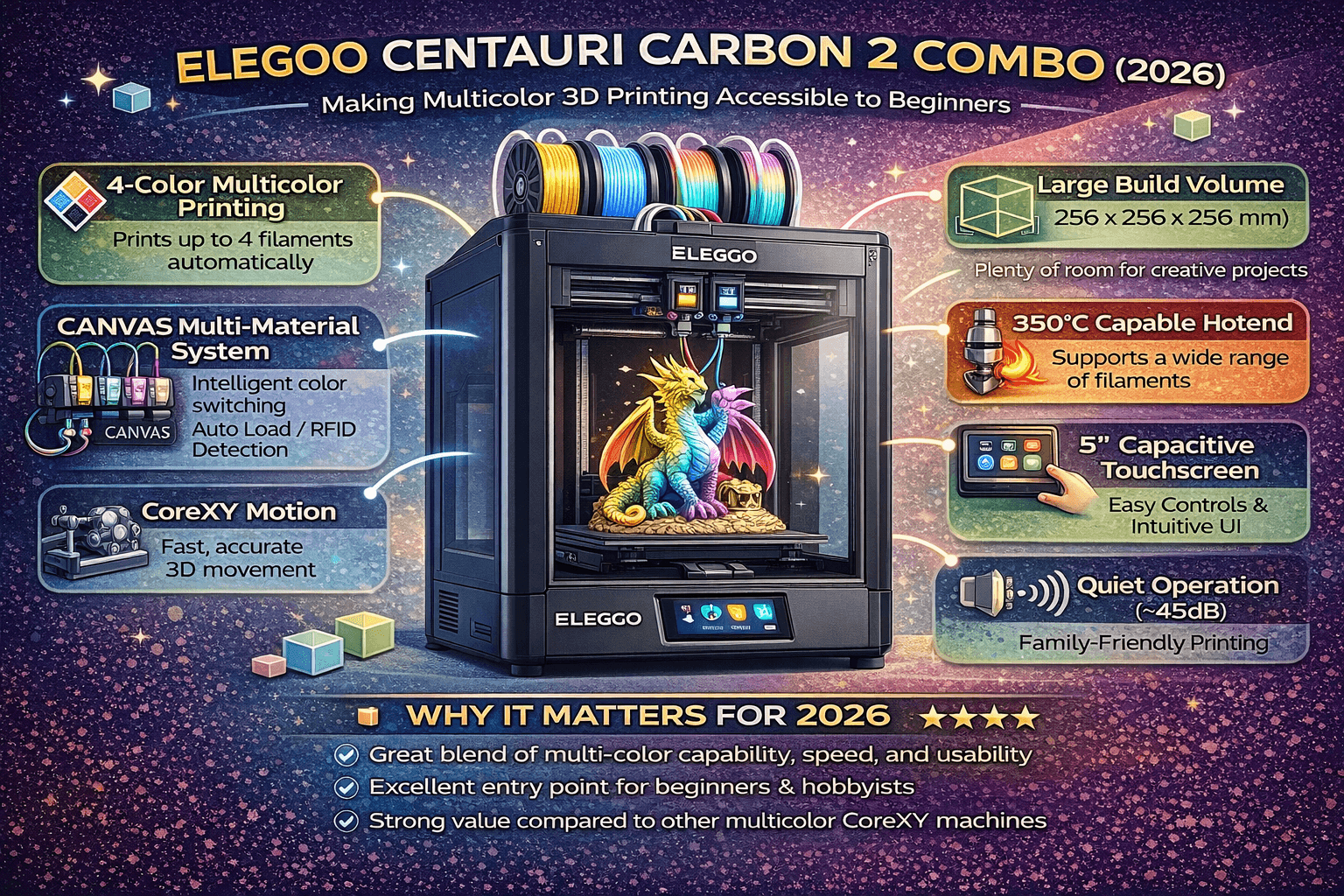
For years, multicolor 3D printing was a complex, expensive proposition—requiring multiple extruders, manual filament swaps, or intricate MMU systems. But at CES 2026, Elegoo changed the game with the launch of the Centauri Carbon 2 Combo, a family-friendly multicolor 3D printer priced at just $449. This printer brings vibrant color printing within reach of beginners, educators, and hobbyists who want professional results without the professional learning curve.
What Is the Centauri Carbon 2 Combo?
The Centauri Carbon 2 Combo is the successor to Elegoo’s popular Centauri Carbon, but with a crucial addition: the integrated CANVAS (Color Automation with Smart Switching) system. This 4-color printing system allows you to load up to four filaments and automatically switch between them during a print, enabling full-color gradients, multi-material parts, and practical objects with different material properties—all without manual intervention.
But what truly sets it apart is its beginner-focused design. From unboxing to first print, Elegoo has streamlined every step to be as intuitive as possible. Let’s dive into the features that make this printer stand out.
Key Features That Benefit Beginners
4-Color Printing with CANVAS System
The CANVAS system is the heart of the Centauri Carbon 2. It includes:
- Automatic filament switching: The printer’s toolhead automatically loads the next filament when needed, thanks to a filament hub and smart splicing mechanism.
- Instant filament loading: No manual purging or cleaning; the system wipes the nozzle and primes the next color seamlessly.
- Built-in filament backup: If one filament runs out, the printer can switch to another spool automatically, reducing print failures.
- RFID-based filament detection: Each filament canister includes an RFID tag that tells the printer the material type, color, and remaining length. The system then auto-suggests optimal temperature and print settings.
For beginners, this means you can focus on your design, not on calibrating multiple extruders or managing complex MMU setups.
One-Click Calibration and Smart Monitoring
Leveling the bed and calibrating the printer is often the biggest hurdle for newcomers. The Centauri Carbon 2 eliminates this with 31 integrated smart sensors that handle auto-leveling and calibration automatically. You simply place the printer on a stable surface, insert the USB drive with your file (or send via Wi-Fi), and hit print. The printer takes care of the rest.
Additionally, the system monitors for potential issues like filament jams, temperature deviations, and layer shifts, pausing the print and alerting you via the touchscreen or smartphone app.
Quiet, Intuitive, and Home-Friendly Design
Operating at just 45 dB, the Centauri Carbon 2 is quiet enough to run in a living room, home office, or bedroom without disturbing others. This is a huge plus for families and shared spaces.
The 5-inch capacitive touchscreen offers a smartphone-like interface with 11 language options. Navigating menus, previewing prints, and adjusting settings feels natural even for users with no technical background.
Wide Material Support
With a 350°C hardened steel nozzle and an enclosed heated chamber, the Centauri Carbon 2 can handle a broad range of filaments—from basic PLA and PETG to advanced engineering materials like Nylon, Polycarbonate, and even some fiber-reinforced composites. This flexibility grows with your skills, making it a long-term investment.
Integrated Ecosystem
Elegoo provides a cohesive software ecosystem:
- Nexprint: A cloud platform for discovering models, slicing, and managing print jobs remotely.
- ELEGOOSlicer: A customized version of popular slicing software with pre-configured profiles for the Centauri Carbon 2 and CANVAS system.
- MATRIX App: A mobile app for controlling the printer, monitoring prints, and receiving notifications.
This integrated approach reduces the guesswork and compatibility issues that often plague beginners.
Pricing and Availability
The Elegoo Centauri Carbon 2 Combo launched on January 26, 2026 with a retail price of:
- $449 USD
- €439 EUR
- £339 GBP
- $619 CAD
- $999 AUD
- ¥79,999 JPY
It’s available directly from Elegoo’s official website, with shipping to the USA, Canada, European Union, Australia, and Japan.
Who Is This Printer For?
The Centauri Carbon 2 is ideal for:
- Families: Quiet operation, safe enclosed design, and easy multi-color printing make it a great shared device.
- Creative hobbyists: Artists and makers who want to experiment with color without breaking the bank.
- Beginners: Automatic calibration, guided workflows, and a supportive ecosystem lower the entry barrier.
- Educators: Classroom-friendly features and reliability for teaching 3D design and printing.
Pros and Cons
| Pros | Cons |
|---|---|
| Affordable multicolor printing at $449 | Smaller build volume (not specified in our data, but likely similar to Carbon: maybe 300×300×300mm) |
| Fully automatic calibration and leveling | 4-color only; not full CMYK (but enough for most projects) |
| Quiet operation (45 dB) | New product; long-term reliability still unproven |
| RFID filament detection and auto-settings | Dependent on Elegoo’s ecosystem (Nexprint, ELEGOOSlicer) |
| Wide material support up to 350°C | |
| Integrated CANVAS system (no external MMU purchase) |
Competitor Comparison
The closest competitor is the Bambu Lab A1 mini with AMS lite:
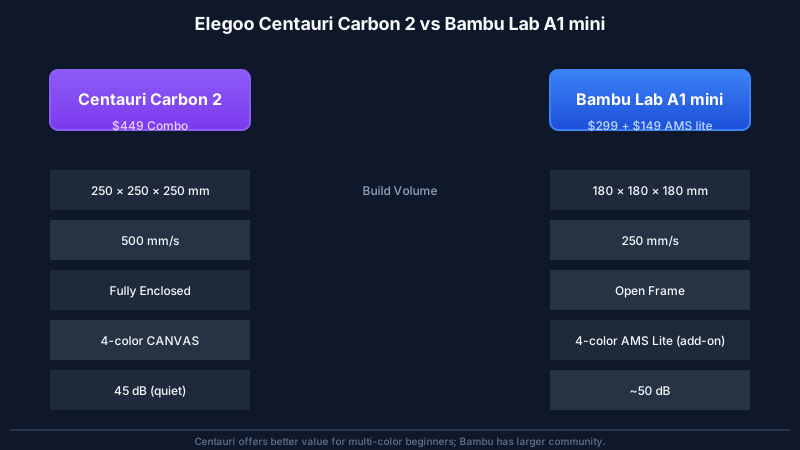
- Bambu Lab A1 mini: $299 printer + $149 AMS lite = $448 total. Very fast, excellent cloud integration, huge community. However, the A1 mini is an open-frame design, less enclosed, and AMS lite is a separate add-on that requires attachment.
- Centauri Carbon 2 Combo: $449 includes everything in one package. Enclosed chamber (better for temperature-sensitive materials), quieter, and includes a touchscreen with multi-language support. The CANVAS system is purpose-built for this printer.
Both are strong choices. The Centauri Carbon 2 edges ahead for beginners who want an all-in-one, family-friendly package with quiet operation and a fully integrated color system.
Verdict: Should You Buy the Centauri Carbon 2 Combo?
If you’re looking to start 3D printing with color and want a hassle-free experience, the Elegoo Centauri Carbon 2 Combo is an excellent option. It combines automatic calibration, quiet operation, and a seamless multicolor system at a price that undercuts many competitors. While it’s a brand-new product, Elegoo has built a solid reputation with decent customer support and a growing community.
For a more in-depth comparison of beginner printers, check out our Beginner Printers guide. And if you’re planning your first prints with PETG or other materials, we have dedicated guides to help you succeed.
Bottom line: The Centauri Carbon 2 Combo lives up to its “family-friendly” promise. It’s the printer we’d recommend to a friend who wants vibrant, multicolor prints without the technical headache.
Related Resources
For further reading and resources:
- Best Beginner 3D Printers February 2026 – Our roundup includes the Centauri and other top picks.
- Bambu Lab A1 Review – Compare with another excellent starter printer.
- Filament Settings Database – Get optimal profiles for your materials.
- Ultimate Calibration Guide – Ensure your printer is tuned correctly.
External references:
- Elegoo Official Centauri Carbon 2 Announcement
- Bambu Lab Official Site
- Elegoo Centauri Carbon 2 Review – 3DPrint.com
Frequently Asked Questions
What is the best 3D printing filament for beginners?
PLA is the best starting filament — it prints easily at 190-220°C without an enclosure and produces good results. Once comfortable, PETG offers better strength and temperature resistance for functional parts.
How do I choose the right filament?
Consider the application: PLA for display models, PETG for functional parts, ABS/ASA for heat/sunlight exposure, TPU for flexible parts, and specialty filaments for engineering applications. Each has specific printer requirements.
What temperature should I print different filaments at?
PLA: 190-220°C nozzle / 50-60°C bed. PETG: 220-250°C / 70-80°C. ABS: 230-260°C / 100-110°C (enclosure needed). Nylon: 240-270°C / 70-90°C. Always check manufacturer recommendations for specific brands.
📌 Related Articles
- Bambu Lab A1 vs Elegoo Centauri Carbon: Full Specs Comparison & Buyer’s Guide
- Best 3D Printer Upgrades That Actually Improve Print Quality: Complete 2026 Guide
- ABS 3D Printing Settings Guide: Temperature, Enclosure, and Cooling for Strong Parts
- Best Budget 3D Printer Upgrades That Actually Improve Print Quality: Belts, Springs, Hotends & More
- Creality Creality Ender 3 V3 Plus vs Creality Ender 3 Pro: Full Specs Comparison & Buyer’s Guide